

Air hockey is normally won by reaching a set number of goals, mallets are not allowed to cross the center line, and covering the puck with your hand or paddle is a foul. Those rules come from physical arcade tables — this guide checks them against the actual code of Air Hockey 3D, the free browser version on this site, so you know exactly where the digital table matches the real one and where it doesn't.
The Rules Most Tables Play By
Air hockey has no single global rulebook — arcades, home tables, and tournament leagues each run house rules — but a core set is shared almost everywhere:
- Scoring: matches commonly run to 7 goals, though this target varies by venue and format.
- Serve after a goal: the player who was scored on typically serves next.
- Center line: a mallet may never cross into the opponent's half, even to block.
- Topping: resting your mallet on top of the puck to stop it dead is a foul.
- Palming: covering or trapping the puck with your free hand is also a foul.
- Puck off the table: handling varies by ruleset — some give the opponent possession, others restart from center.
- Shot clocks: some competitive rulesets require a shot within a few seconds of gaining the puck, so a player can't just sit on it; casual play usually skips this.
Rules with real variation between leagues are flagged as "varies" below rather than stated as fact. Everything said about the digital game is checked against its own source files.
Where Air Hockey 3D Matches — and Breaks — Those Rules
In the version on this site, the center-line restriction is real: your mallet and the computer's mallet are each mathematically clamped to their own half of the table, matching the physical rule exactly.
Topping and palming can't happen at all in Air Hockey 3D, for a structural reason rather than a rule: your mallet is a physics object that can only push the puck on contact. There's no hand, and no way to rest anything on top of a puck simulated as a rigid body — the foul isn't representable in the code.
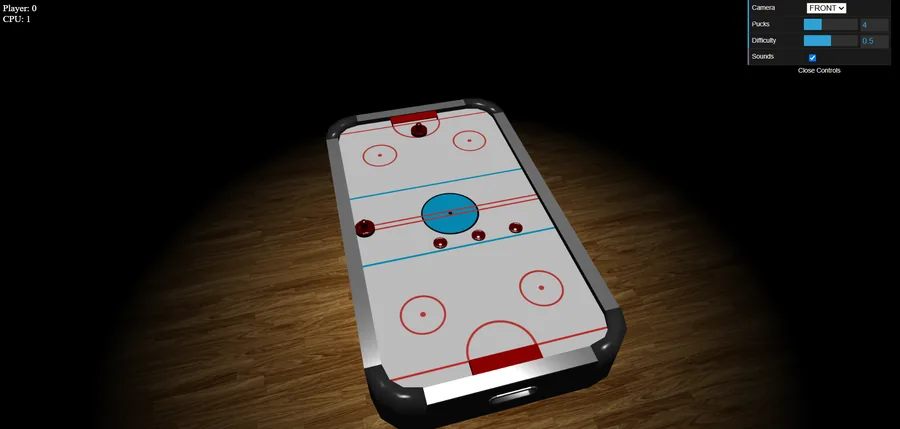
Where the game diverges hardest is puck count and match length. Four pucks are in play at once by default, not one — adjustable from 1 to 10 in the settings panel. And while the code does hold a "target score" of 10 goals, nothing ever reads or compares that number against the live score. There is no win condition: the scoreboard just keeps counting for both sides, with no round limit and no win screen.
Serving is different too. Since several pucks are usually moving at once, a goal only removes the puck that went in — play continues with whatever's still active. A full re-serve, with every puck lined up again, happens only once every puck on the table has gone into a goal, and it always reappears on your (the human player's) side of the center line, regardless of who scored last. Unlike the "loser serves" convention, the digital reset never favors the player who just conceded.
How the Computer Opponent Actually Decides Where to Move
The AI in Air Hockey 3D doesn't plan shots or aim at your goal. On every frame, it scores every puck on its half of the table and picks the single most threatening one to chase.
A puck only counts as a threat if it's active, on the AI's half, and not already moving toward your side. Among those, the one closest to the AI's own goal mouth scores highest, so the computer prioritizes the puck nearest to going in over one that just wandered into its territory. A puck already behind the goal line's depth gets its score cut to a fifth, since it's essentially already through. If nothing qualifies, the AI falls back to a fixed defensive spot roughly 40% of the way from center toward its own goal, rather than parking on the goal line itself.
Once it has a target, the AI aims just behind the puck, offset by a small margin tied to mallet and puck size, so it makes contact from the right side instead of ramming straight into it. That target is always clamped to the AI's own half and the table's playing area — the same boundary math that stops it crossing the center line also keeps it from over-committing into its own goal mouth.
Difficulty Levels, in the Actual Numbers
The difficulty slider in Air Hockey 3D runs from 0 to 1 and does exactly one thing: scale how fast the AI's mallet moves toward its target. It has no effect on the decision logic above — an easy-mode AI chooses the same puck a hard-mode AI would, it just gets there slower.
Measuring the game's movement formula against the real dimensions of its 3D table model gives these mallet speeds, at the standard 60-frame-per-second update rate the game runs at:
| Difficulty | Sideways speed (table-widths/s) | Forward/back speed (table-depths/s) | Time to sweep the entire goal mouth |
|---|---|---|---|
| 0.0 (easiest) | 0.18 | 0.18 | 1.67 s |
| 0.25 | 0.58 | 0.58 | 0.51 s |
| 0.5 (default) | 0.99 | 0.99 | 0.30 s |
| 1.0 (hardest) | 1.80 | 1.80 | 0.17 s |
Two things fall out of that formula. First, the jump from easiest to hardest is exactly a 10x increase in mallet speed — a linear scale from a 0.1 multiplier to a 1.0 multiplier, not a subtle curve. Second, because the AI's forward-and-back speed is tied to the table's depth and its sideways speed is tied to the table's width, and the table is measured at close to 1.86 times longer, goal-to-goal, than it is wide, the mallet moves about 1.86 times faster in absolute terms going forward or back than it does side to side, at every difficulty. A defensive correction of a given size closes much faster along that goal-to-goal axis than the same size correction covered sideways. At the default 0.5 difficulty, the AI needs only about 0.06 seconds to close the 0.16-unit gap between its fallback spot and its own goal line — a distance well under the 0.46-unit-wide goal mouth it would need 0.30 seconds to sweep end to end.
The Physics Behind Every Bounce
Air Hockey 3D runs on a real 2D physics engine (Box2D) rather than scripted bounces, and the numbers assigned to the puck, the mallets, and the boards are all different:
| Object | Friction | Restitution (bounciness) |
|---|---|---|
| Puck | 0.2 | 0.8 |
| Mallet | 0.5 | 0.5 |
| Boards / goal posts | 0.1 | 0.8 |
Two things stand out. The boards are slippery (low friction) and lively (high restitution, matching the puck's own 0.8), so a puck off a board keeps most of its speed — like a real puck skidding off a rubber bumper. The mallet is stickier (0.5 friction) and less bouncy (0.5 restitution) than either. A puck that only grazes your mallet loses more energy to friction than one that clips a board dead-on, so a square, centered hit beats a glancing one.
There's no drag or air resistance applied to the puck while it glides — friction here only acts at the moment of contact. That's a faithful match to a real table's air cushion: nothing slows the puck between hits, so it keeps its speed until it touches a wall, a post, or a mallet.
Your mallet also isn't teleported onto your cursor or finger — it's a physics body pulled toward that point by a joint with a fixed maximum force, the same setup used for the computer's mallet. A slow drag barely moves the puck, while a fast flick carries real momentum into the contact, the same way a physical slap shot works.
Tips That Actually Hold Up Against the Numbers
- Play the sides, not the middle. The computer's mallet moves about 1.86 times faster in absolute terms front-to-back than side-to-side, at every difficulty, because that ratio is baked directly into the table's own proportions. A shot demanding lateral coverage asks more of its slower axis.
- Take your first touch right after a full reset. Every reset lines the pucks up slightly on your side of the center line by design, not the computer's — a small but real first-touch window each time.
- On the default difficulty, the mallet needs about three-tenths of a second to cover its own goal's width. Shots that arrive faster than that, or that change direction off a board late in their path, leave it less time to get across.
- Hit the puck squarely, not on the edge of your mallet. The mallet's friction (0.5) is higher and its bounciness (0.5) is lower than the puck's own numbers, so a glancing contact bleeds off more speed than a centered one.
- Use a real flick, not a slow push, for a hard shot. Since the mallet is a joint-driven physics body rather than a cursor teleported onto the puck, the speed of your hand or mouse decides how much momentum lands on the puck.
- Drop the puck count to one for the closest match to physical rules. With several pucks the game plays nothing like standard single-puck air hockey; the settings-panel slider set to 1 is the closest this version gets to traditional pacing.
For a different rules-driven table game measured the same way, see the eight ball pool rules guide for 8 Ball Pool, or the Nine Men's Morris rules and strategy guide. Mini Golf shares the physics-driven table with a very different scoring shape. The full list of walkthroughs lives on the guides page.
Frequently Asked Questions
How many goals do you need to win a game of air hockey?
Most tables and casual leagues play to 7, though this varies by venue. In Air Hockey 3D there's no fixed target: the code holds a value of 10 but never checks it against the live score, so a match continues indefinitely.
Can you cross the center line in air hockey?
No — reaching into the opponent's half is a foul on a physical table, and the same restriction is enforced in Air Hockey 3D: both mallets are mathematically locked to their own half.
What is topping in air hockey?
Topping is resting your mallet flat on the puck to trap it, a foul on most physical tables. It isn't possible in the digital version — the mallet can only push the puck, never cover or trap it.
What happens if the puck flies off a real air hockey table?
Rulesets differ: some give the opponent possession, others restart from center. There's no equivalent in Air Hockey 3D — its rink is a fully enclosed shape with rounded corners, and the puck leaves play only through a goal slot.
Does the difficulty setting change how the computer thinks?
No. It only scales the computer's mallet speed, from a 0.1x multiplier at the easiest setting to a full 1.0x at the hardest. The logic used to pick which puck to defend stays identical at every setting.
How many pucks are in play at once in Air Hockey 3D?
Four, by default — not the single puck used on a standard table. The count can be changed from 1 to 10 in the settings panel; 1 is the closest match to traditional pacing.